OpenAI temporarily paused new sign-ups and upgrades for the ChatGPT Pro $200 plan, also called Pro 20X, on September 10, 2026. If you recently opened ChatGPT expecting to buy the highest individual tier and could not find a working upgrade path, the problem is probably not your card or account. New Pro $200 purchases are currently unavailable.
The pause does not mean ChatGPT Pro has been discontinued, and it does not mean GPT-6 Astra has gone offline. Existing Pro $200 subscriptions can continue renewing, Pro $100 remains available, and Astra can still be accessed through eligible ChatGPT plans, ChatGPT Work, Codex, and supported model gateways.
This guide explains the current situation, answers how to subscribe to the $200 Pro plan during the pause, shows how to use Astra in each OpenAI product, and introduces YYLX.IO as an alternative for users who primarily need model access rather than the full ChatGPT membership bundle.
What changed with ChatGPT Pro $200?
| Account status | Can you get Pro $200 now? | What to know |
|---|---|---|
| Free, Go, or Plus | No new upgrade to $200 | Pro $100 remains available |
| Pro $100 | No upgrade to $200 during the pause | Your current plan is not affected |
| Existing Pro $200 | Yes, through normal renewal | Avoid accidental cancellation, downgrade, or payment failure |
| Mainly interested in Astra | You may not need a new $200 plan | Check Chat, Work, Codex, or an API-compatible route |
OpenAI’s current help article says the temporary pause applies to both new sign-ups and upgrades from Free, Go, Plus, or Pro $100. No reopening date has been announced.
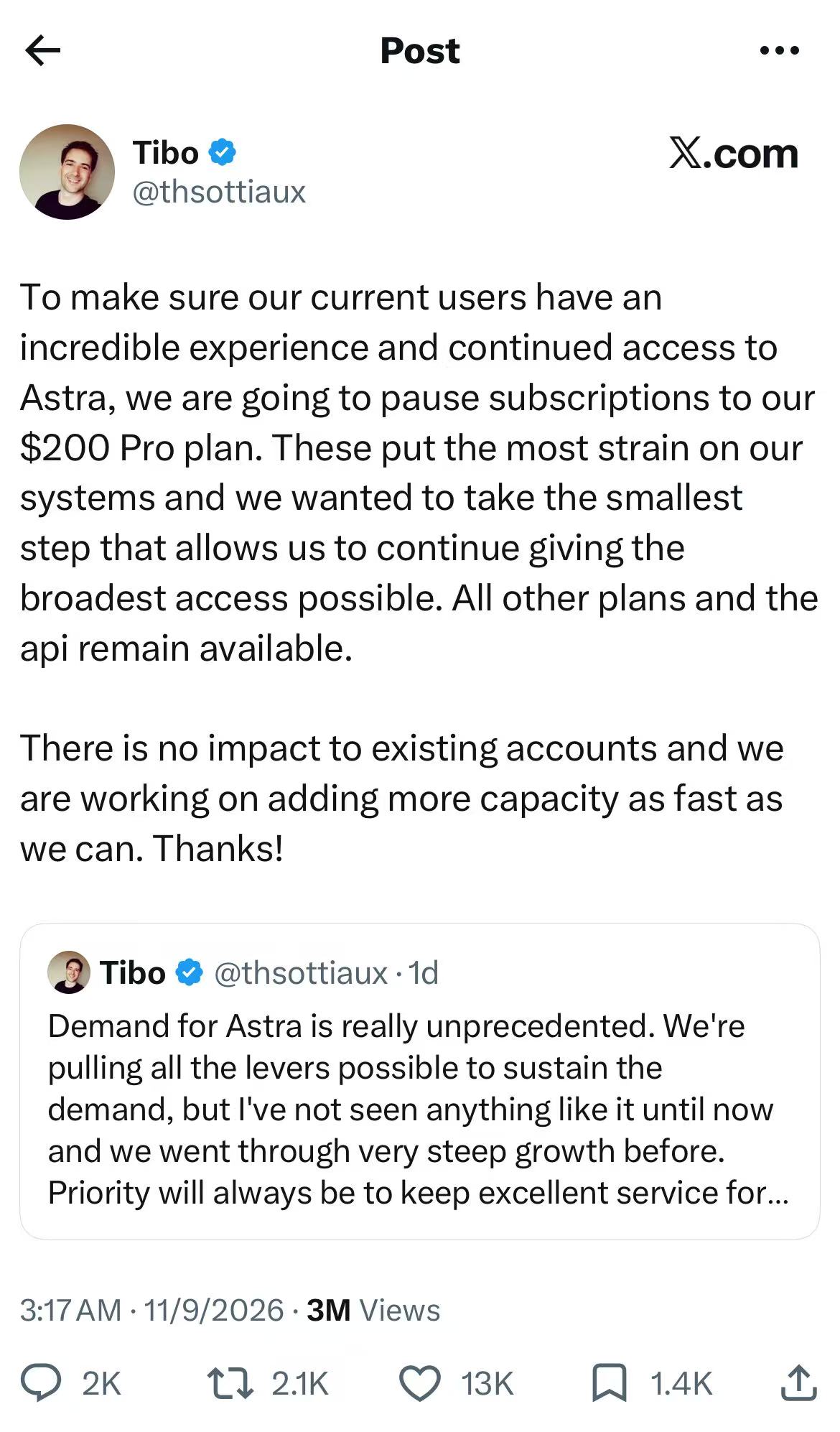
Image: User-provided screenshot of the public announcement. The post explains that the $200 subscription pause is intended to protect the Astra experience for existing users while more capacity is added; other plans and the API remain available.
Why did OpenAI pause the highest Pro tier?
The public explanation points to unusually high demand for Astra. Pro $200 is the heaviest individual usage tier, so pausing new subscriptions was presented as the smallest capacity-control measure that could preserve service quality for existing customers and keep access available more broadly.
Two distinctions matter:
- This is described as a temporary capacity decision, not the permanent retirement of Pro $200.
- Existing subscriptions, other plans, and API access were not paused across the board.
Instead of repeatedly retrying the payment page, first decide what you actually need. Some users want GPT-6 Pro inside the standard ChatGPT conversation interface. Others want Astra for coding, research, or agentic work in Work and Codex. Developers may only need a model endpoint for a compatible client. Those are different products with different access and usage rules.
How can you subscribe to the ChatGPT Pro $200 plan now?
The direct answer is simple: you cannot start a new Pro $200 subscription or upgrade to it while the pause remains in effect. There is no official checkout workaround for Free, Go, Plus, or Pro $100 accounts.
Be cautious with shared accounts, unofficial upgrade services, and sellers claiming to have a private subscription channel. These offers can create account-security, billing, and terms-of-service risks, and they cannot guarantee that the plan will renew.
Your legitimate options are:
- Keep an existing Pro $200 subscription active. Confirm that your payment method works. Do not casually cancel or schedule a downgrade. If the subscription ends, you cannot buy it again until OpenAI lifts the pause.
- Choose Pro $100 if it meets your needs. OpenAI still allows eligible users to purchase Pro $100 from the pricing page or through Settings → My Plan. It provides the same core Pro feature set with a lower usage allowance.
- Wait for Pro $200 sign-ups to reopen. OpenAI has not committed to a date, so the official pricing page and Help Center should be treated as the source of truth.
In other words, “how to subscribe to the $200 Pro plan” currently has a status answer rather than a payment trick: new purchases are paused, existing subscribers should protect their renewal, and everyone else must wait or use another eligible route.
How to use Astra in regular ChatGPT
Astra’s model name is GPT-6 Astra. Inside standard ChatGPT conversations, the model appears as GPT-6 Pro powered by Astra.
According to OpenAI’s current documentation:
- GPT-6 Pro is available in ChatGPT to Pro $100, Pro $200, Business, and Enterprise users.
- Plus does not include GPT-6 Pro in regular Chat, although Plus includes limited Astra access in ChatGPT Work and Codex.
- Enterprise availability can also depend on workspace model permissions.
If your plan is eligible, open the model picker, select the Pro category, and choose GPT-6 Pro. If it is missing in the desktop app, use Menu → Check for Updates, install the latest available version, fully quit the app, and restart it.
OpenAI currently lists 50 GPT-6 Pro messages per week for Pro $100 and 200 messages per week for Pro $200 in Chat. These limits can change, and the allowance displayed in your account should override any number in a news article.
How to use GPT-6 Astra in ChatGPT Work or Codex
Work and Codex are often the better fit for software development, deep research, document analysis, and longer agentic tasks. Astra is offered directly as GPT-6 Astra in these environments.
Use this checklist:
- Update the ChatGPT desktop app to the newest version. If you use Codex CLI, Astra requires version 0.153.0 or later.
- Make sure you are signed into the correct account and workspace.
- Start a task and choose GPT-6 Astra from the available models.
- Select a reasoning level appropriate for the task. Low or Medium is a sensible starting point; reserve higher effort for genuinely difficult work.
- Open Settings → Usage to check your five-hour window, weekly allowance, and reset time before starting a large task.
OpenAI describes Astra as its most capable option for coding, research, analysis, and complex problem-solving. Higher reasoning effort can use more allowance and does not automatically improve every result. Clear instructions, the right files, and the necessary permissions often matter more than simply moving the reasoning slider to its maximum.
Chat and Work/Codex do not share one simple message counter. GPT-6 Pro in Chat has its own availability and limits, while Work and Codex share a separate allowance. Having Astra in Work does not necessarily give you GPT-6 Pro in Chat.
Cannot subscribe to Pro $200? Access Astra through YYLX.IO
If you need Astra’s model capabilities more than you need the complete ChatGPT subscription experience, you can also check YYLX.IO.
YYLX.IO is an AI model relay designed for users of Codex, ChatGPT-compatible clients, and other tools that support a custom Base URL and API key. It separates model access from the official ChatGPT membership checkout. That means you do not need to successfully purchase the paused Pro $200 plan before using an Astra route currently offered in the YYLX.IO dashboard.
A typical setup looks like this:
- Create an account and sign in to YYLX.IO.
- Add balance and generate an API key.
- Check the dashboard for a group that currently supports Astra, including the exact model name and endpoint.
- Enter the provided Base URL, API key, and model name in a compatible client.
- Test with a small task before moving a large codebase or long research workflow to the route.
Model names, groups, rates, and availability can change as upstream capacity changes, so always use the live YYLX.IO dashboard as the source of truth. If a client does not list Astra in its menu, it may still support manually entering the model name.
This distinction is important: YYLX.IO provides a model-access route. It does not upgrade your personal ChatGPT account to Pro $200. Features tied to the official ChatGPT membership—such as the GPT-6 Pro option in the web interface, native memory, voice, ChatGPT history, and other bundled benefits—are not automatically unlocked by purchasing relay credit.
Which Astra access option should you choose?
| What you need | Best route to consider |
|---|---|
| The complete ChatGPT membership experience | Pro $100 now, or wait for Pro $200 to reopen |
| You already have Pro $200 | Keep the subscription active and protect the renewal |
| GPT-6 Pro in ordinary ChatGPT conversations | Pro $100, existing Pro $200, Business, or Enterprise |
| Astra for coding and agentic tasks | Eligible Plus, Pro, or Business access through Work/Codex |
| Model access without a Pro $200 subscription | An API-compatible Astra route such as YYLX.IO |
| Integration with your own tools | Official API or YYLX.IO, based on access, cost, and compatibility |
Frequently asked questions
When will ChatGPT Pro $200 subscriptions reopen?
OpenAI calls the measure temporary but has not announced a reopening date. Check the official ChatGPT pricing page and Help Center for the latest status.
Can Pro $100 users access Astra?
Yes. OpenAI currently says Pro $100 includes GPT-6 Pro powered by Astra in Chat, as well as Astra access in Work and Codex. Its allowances are lower than those of Pro $200.
Can ChatGPT Plus users access Astra?
Plus includes limited Astra access in ChatGPT Work and Codex, but it does not include GPT-6 Pro in regular Chat. Rollout, app version, region, and workspace settings can also affect what appears in your account.
Do I still need ChatGPT Pro if I use YYLX.IO?
Not necessarily. If you only want to call Astra from a compatible client or development tool, a relay route may be sufficient. You still need an official plan if you want the ChatGPT web experience and membership benefits tied to that plan.
Is Pro $200 unlimited?
No. OpenAI lists separate usage allowances for GPT-6 Pro and other Pro models. Reaching a model allowance does not end your subscription, but you may need to wait for a reset or use another available model.
Final takeaway
As of September 11, 2026, new ChatGPT Pro $200 sign-ups and upgrades are paused. Existing Pro $200 subscriptions can continue renewing, while Pro $100 and other plans remain available. New users cannot legitimately force a $200 checkout during the pause.
Astra itself remains available through several paths. Eligible users can choose GPT-6 Pro in Chat, select GPT-6 Astra in Work or Codex, or use a compatible model gateway. If the subscription pause or regional payment friction prevents you from getting Pro $200—and you mainly need model access—visit YYLX.IO to review the currently available Astra groups and connection instructions.
发表回复